Your Library
Dashboard → Downloads is now Dashboard → Library. Everything you’ve bought is there as before, and now you can press play on any track — or Play Release on a whole release — to stream it instantly through the site player while you keep browsing.- Search your library by release, artist or track.
- Downloads are unchanged: pick WAV, FLAC or MP3 whenever you want the files.
Social graphics
Create ready-to-post images for any published release in three formats: Instagram post (4:5), Instagram story (9:16) and Facebook post (1:1). Each shows your cover art, an “Available now on WAVjunkie” line and a WAVjunkie × artist name lockup.- Find Social graphics in the ⋯ menu on My Releases, or in the Share section of your own release pages.
- Images are generated on your device and downloaded as PNGs.
Embeddable player
Put a WAVjunkie player for any release on your own website, blog or press page.- Copy the embed code from My Releases (the ⋯ menu on each published release) or from the Share this release section on any release page.
- Singles get a compact player; EPs and albums show the full tracklist.
- Visitors hear 60-second previews and can tap Buy on WAVjunkie to get the full release.
Gift Baskets
Artists can now bundle their own releases into a Gift Basket at a price they choose, from Dashboard → Gift Baskets.- Each basket gets a private link and a short code to share with fans, friends or customers.
- Set an optional redemption limit and expiry date, and switch a basket off at any time.
- Recipients open the link (or enter the code at wavjunkie.com/redeem), check out the whole basket, and every release lands in their Downloads.
- Baskets are checked out on their own and can only contain the artist’s own releases. Each release keeps the $1.00 minimum.
A single dashboard with a side menu
Thanks to everyone who tried the black-and-white test dashboard. We’ve retired it and brought everyone back to the main dashboard, now with a side menu so every page is one tap away.- Pages are grouped into Studio, Money & Library, Audience and Account, each with a short note on what it’s for.
- On desktop, collapse the menu to icons for more room, or expand it again — it remembers your choice.
- On mobile, tap Dashboard menu at the top of the page to open it.
- Crates now live in the main dashboard. Old links to the test dashboard take you to the right place automatically.
- Earnings and Downloads now have their own pages, and the Dashboard menu in the top header matches the side menu.
- Fixed: some buyers couldn’t see the download button for music they’d bought. Every purchase can now be downloaded.
Full discography discount
Artists with 3 or more releases can now offer fans their whole catalogue at a discount they choose (5–50%). Fans see a Buy full discography offer on the artist page with the saving shown upfront; releases they already own are left out, and every release keeps the $1.00 minimum.Choose your download format
The Downloads page now lets you pick WAV (original), FLAC (lossless) or MP3 320. Conversions are made from the original WAV and checked before saving — if anything doesn’t match, you get the WAV instead. Uploads remain WAV-only.International Music Day
For 24 hours on Thursday 1 October 2026, from 00:00 to 23:59 CEST:- Unlimited uploads — monthly upload limits are lifted for every artist account.
- 0% platform fee — artists keep 100% of every sale made during the window.
Crates
Artists can now build Crates — curated listening collections made from anything on WAVjunkie.- Create a crate from your dashboard, give it a title and description, then search for artists, albums, EPs, singles or individual tracks and add them with one tap.
- Mix whole releases and single tracks in the same crate, and reorder everything with up and down arrows or by dragging.
- Each of your crates needs its own title, and you can upload a share image for link previews — otherwise the artwork of the first release in the crate is used.
- Keep a crate private while you work on it, then switch sharing on to get a link you can send to anyone. Switch sharing off at any time and the link stops working straight away.
- Every crate shows who curated it, with a link to their artist page, and each item links back to its original release.
Pay what you want
Every release keeps its artist-set price and the $1.00 platform minimum, but listeners can now choose to pay more. Enter a custom amount on the release page or in your cart, or use the quick +$3, +$5, +$10 and +$20 supporter buttons before checkout.The amount you choose is shown clearly in your cart and carried through the purchase, artist earnings and receipt.A cleaner, more immersive player
- Full-screen Now Playing — tap the bottom player to open a full-viewport view with a sticky track header, artwork, controls, lyrics, artist information, credits, release details, sources and what’s up next
- Tidier bottom player — the favourite button has moved into Now Playing to reduce crowding
- Play the whole release — when signed in, a release now carries on to the next track automatically
- Desktop keyboard shortcuts — Space to play/pause, ← / → to skip 5 seconds, M to mute
A stronger foundation under everything
WAVjunkie has been rebuilt on a more robust backend stack. The migration was completed and tested by the platform dev team before anything went live — every page, form, player and purchase flow was walked through end to end on the running platform, and it has been steady ever since.What that means in practice:- Screens load consistently, including the ones that previously stalled or dropped you onto a blank page
- Playback and downloads are more dependable, on desktop and on mobile browsers
- Missing files fail politely — if something genuinely can’t be found, you get a clear message and the page stays usable
- Share links and previews stay correct as releases, artists and tracks move around
The new dashboard is open for testing
We’re redesigning the artist dashboard and you can be one of the first to use it. It’s a deliberately plain, black-and-white take on the same tools — less visual noise, more room for your releases and numbers.How to try it
Open your dashboard and you’ll see a banner: “We’re working on a fresh look for your dashboard. Want to try it first?” Choose Try it and the new design takes over. If you dismiss it by mistake, the banner comes back after a week.What’s inside
- Overview — your releases, activity and anything needing attention, on one screen
- Earnings — sales and payout state, without hunting through menus
- Downloads — everything you’ve bought, in one place, with your files a click away
- Settings — account, security and profile options, including the switch back
- Support — help and bug reports without leaving the dashboard
Not for you today? Switch back
Your choice is yours. There’s a Switch back to original design action inside the new dashboard’s Settings, and we’ll ask what you think once you’ve had a look — that feedback is what decides the final design.Downloads: your whole library in one screen
The new dashboard adds a Downloads section listing every release you’ve bought.- Open any purchased release to see its tracks
- Download a single track or the whole release at once
- Files are the original lossless WAV files at the quality the artist uploaded
- Re-download as many times as you like, from any device — purchases are permanent
Switching artist profiles is now one tap everywhere
The workspace switcher is now available across the artist dashboard, not just in Fan Mail. If you run several artist identities from one account, you can move between them from any screen.Two things we tightened up while we were in there:- The profile you pick stays picked. Switch to a side project, upload or edit a release, and the dashboard still knows which profile you’re working on.
- You always know whose release you’re looking at. Anything published under a secondary profile is labelled with that profile’s name in your release list, so nothing gets attributed to the wrong identity.
Mobile navigation, and a batch of smaller fixes
The mobile menu now behaves like the desktop one.- Discover, Artists and Marketplace are in the menu, under a search box and the Upload button
- The menu scrolls, so nothing is hidden on smaller screens
- Visitors who aren’t signed in see a single Access button; signed-in users get Dashboard and a clearly marked Log Out
One workspace, many artist identities
You can now run multiple artist profiles from a single WAVjunkie account — perfect for producers with side projects, aliases, or collaborative acts. Your login, payout setup, and billing stay on the main workspace, while each artist profile gets its own public identity.What each artist profile gets
- Its own public artist page at its own URL (and discoverable on the Artists page)
- Its own display name, avatar, banner, bio, country, and social links
- Its own releases, attributed and shareable independently
- Its own Fan Mail account — separate subscribers, separate signup page, separate campaigns
What stays shared on the main workspace
- Login and security (password, 2FA, recovery codes)
- Payout setup and earnings (one Stripe connection for all profiles)
- Plan, billing, and Fan Mail sending quota (shared across every profile)
- Reply-to email on Fan Mail campaigns (always your workspace email)
Fan Mail is now profile-specific
Each artist profile has its own subscriber list and signup link. Fans subscribing to one profile won’t automatically receive emails from your other profiles — they choose which artist to follow. Existing subscribers stay attached to your default profile, so nothing is lost.When composing a campaign, the active profile in the Fan Mail dashboard determines who receives it, and the “From” name shown to fans matches that profile.Switching profiles
Use the profile switcher in the Fan Mail and release tools to jump between identities. The active profile is clearly labelled at the top of each screen so you always know which one you’re managing.Plan limits
- Free — 1 artist profile
- Grow — up to 5 artist profiles
- Pro — unlimited artist profiles
Editing a release’s artist now updates its URL
When you re-attribute a release to a different main artist, the release URL automatically updates to match the new artist’s slug. You’ll see a confirmation toast warning that the old link will no longer work, so you can update anywhere you’ve shared it.Old links continue to redirect to the release for a grace period, so existing shares won’t break overnight.One tap to promote any release
The post-publish share modal is now available to every artist for every published release — not just brand-new drops. Open it from My Releases → Share your release on any live release (or Share Coming Soon for scheduled drops).What’s inside
- Cover art preview with the release title, artist, and track count
- A pre-written Your message caption you can edit before posting
- One-tap buttons for Instagram, TikTok, X, Facebook, WhatsApp and Copy link
- Save image (cover art with a WAVjunkie watermark), Copy message, and Copy message + link
Smart default messages
The caption adapts to where the release is in its lifecycle, so you never have to write it from scratch:- Pre-release (scheduled) — “{Title} drops on {date} — stay tuned!”
- First 24 hours after going live — “{Title} just dropped on WAVjunkie — check it out!” (with a ✦ Just dropped badge on the share card)
- After 24 hours — “{Title} is on WAVjunkie — check it out!”
Share your release your way
We’ve simplified the release share screen to give you more control:- Save image — download your cover art with a small WAVjunkie logo overlay, ready to post anywhere.
- Copy message — copy just the share message text.
- Copy message + link — copy your message together with the shareable link in one tap.
Grow the platform. Lower your fees. Keep what you earn.
The WAVjunkie Referral Programme is now live. Every verified referral permanently reduces the commission WAVjunkie takes on your sales — so you keep more on every track you sell, forever.How it works
Share your unique referral link with other independent artists. A referral is counted once the artist you referred has:- Signed up using your link
- Completed Stripe Connect verification
- Published a live track
- Remained active through a 14-day qualifying period
Commission tiers
Once you reach a tier, you keep it permanently. It does not reset, expire, or reduce.
Your referral dashboard
Find everything under Referrals in your account menu. The dashboard shows your unique invite link, counted referrals, referrals in pipeline, your current tier, and progress toward the next tier. Each pipeline entry shows the days remaining in its 14-day qualifying period.Notes for early supporters
Pre-launch artists keep their 15% platform fee at Base, Bronze, and Silver — and still drop to 10% upon reaching Gold (25 counted referrals).Requirements
- Your referral link unlocks once Stripe Connect payout onboarding is complete
- The 14-day qualifying period ensures every counted referral is a real, active artist
- Tier recalculation is automatic — no admin action required
Lyrics for any track
Artists can now add lyrics to any track in their catalogue — new releases and existing ones alike. Lyrics are displayed on release pages for logged-in users.Adding lyrics
The lyrics field is per-track, not per-release, and lives inside each track in the upload flow and the edit release modal.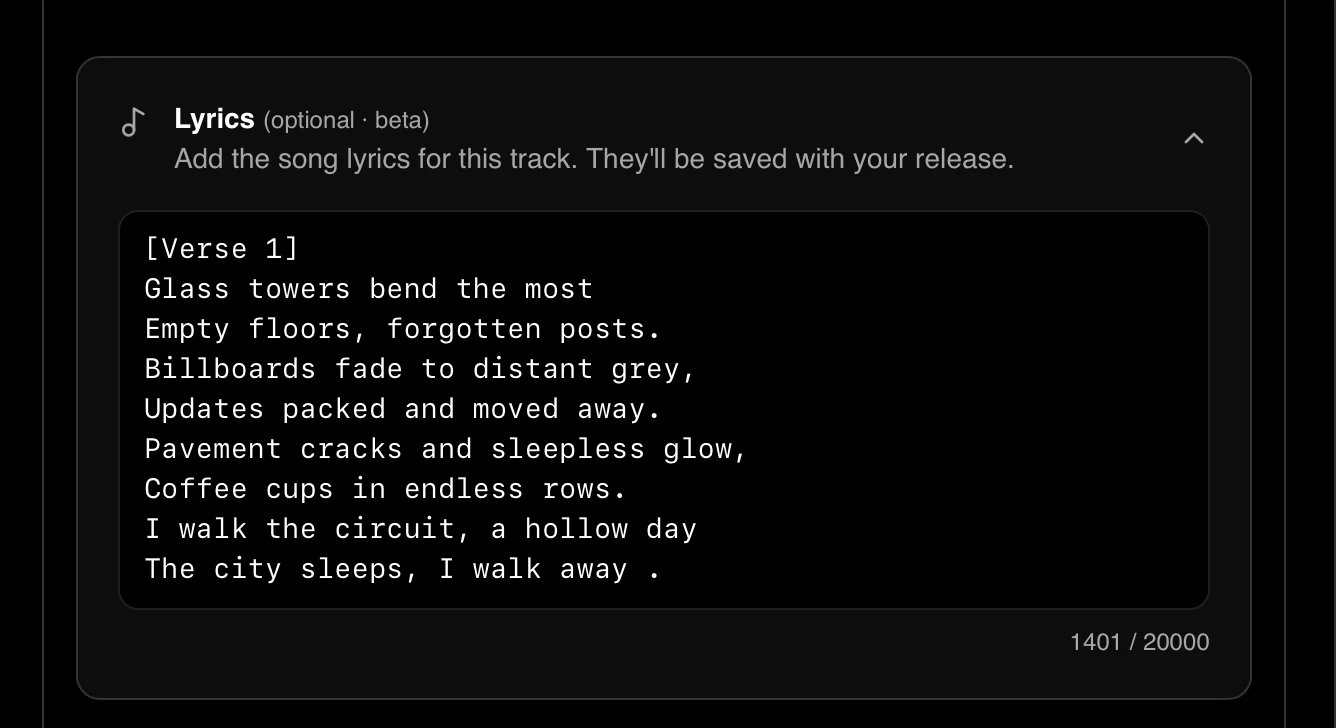
- Format: Plain text only. Line breaks are preserved exactly as entered.
- Required: No. Lyrics are optional on every track.
- Review: None. Lyrics go live the moment you save.
- Editing: Update or remove lyrics at any time from the dashboard.
Viewing lyrics
Lyrics are visible to logged-in users only. Logged-out visitors don’t see a locked or disabled state — the Lyrics button is simply absent.On releases with a tracklist (EPs and albums), each track row that has lyrics shows a Lyrics button next to the duration. Tracks without lyrics show a muted No lyrics label instead. For single-track releases, the Lyrics button appears in the hero action row alongside Play preview, Buy, and Save.Desktop panel
On desktop, lyrics open in a slide-in panel from the right edge of the page. The main content dims slightly while the panel is open. Clicking another track’s Lyrics button while the panel is already open swaps the content in place — no close-and-reopen flicker.Mobile sheet
On mobile, lyrics open as a bottom sheet with a drag handle, taking 70% of the viewport height. Tap the overlay or the close button to dismiss.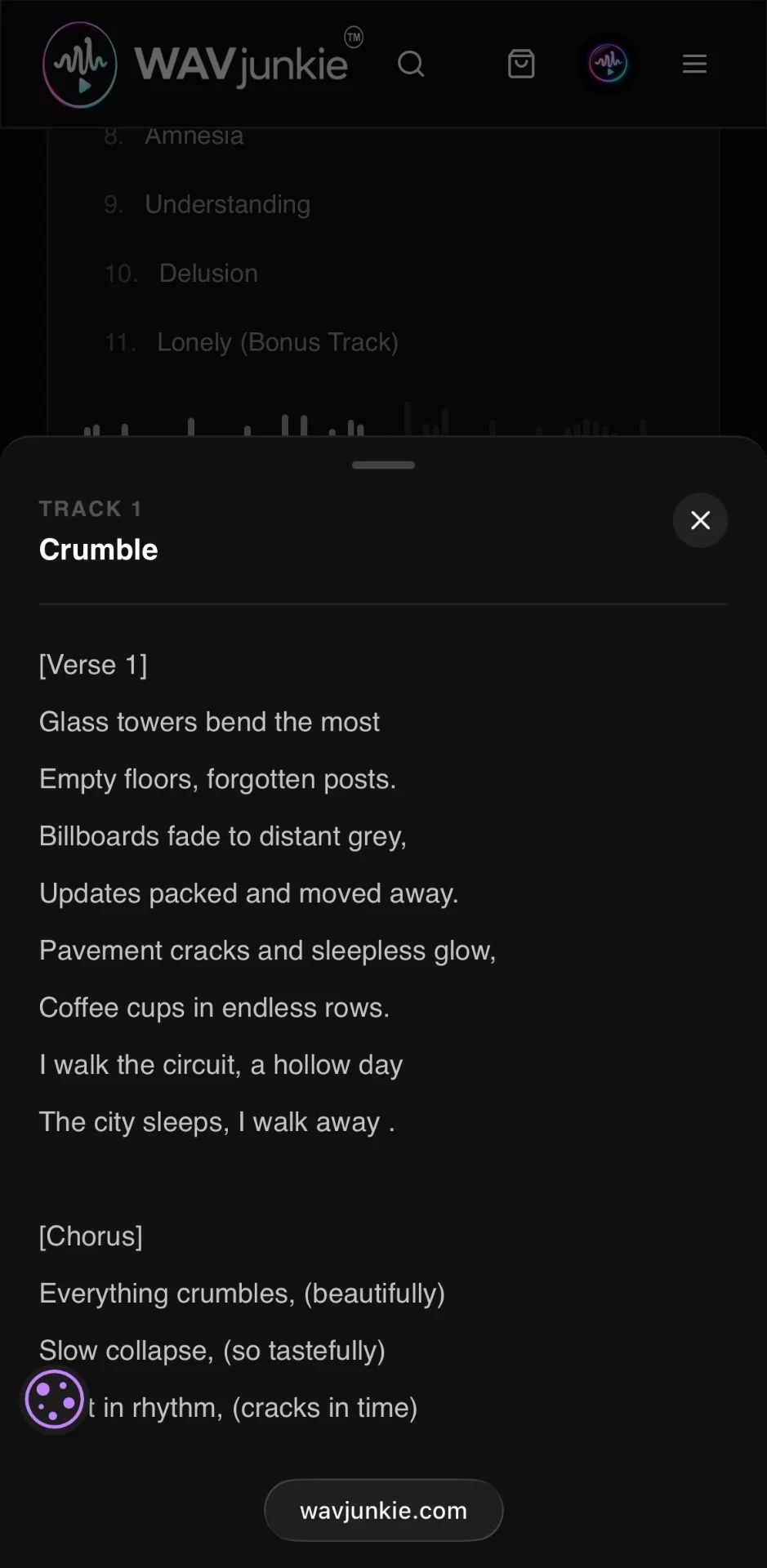
Every release now has its own page
Releases on WAVjunkie no longer open in a modal on top of the Marketplace. Each release now lives at its own dedicated URL:Buy or download, depending on ownership
For users who haven’t purchased the release, the page shows the price, a Buy button, and a Save button.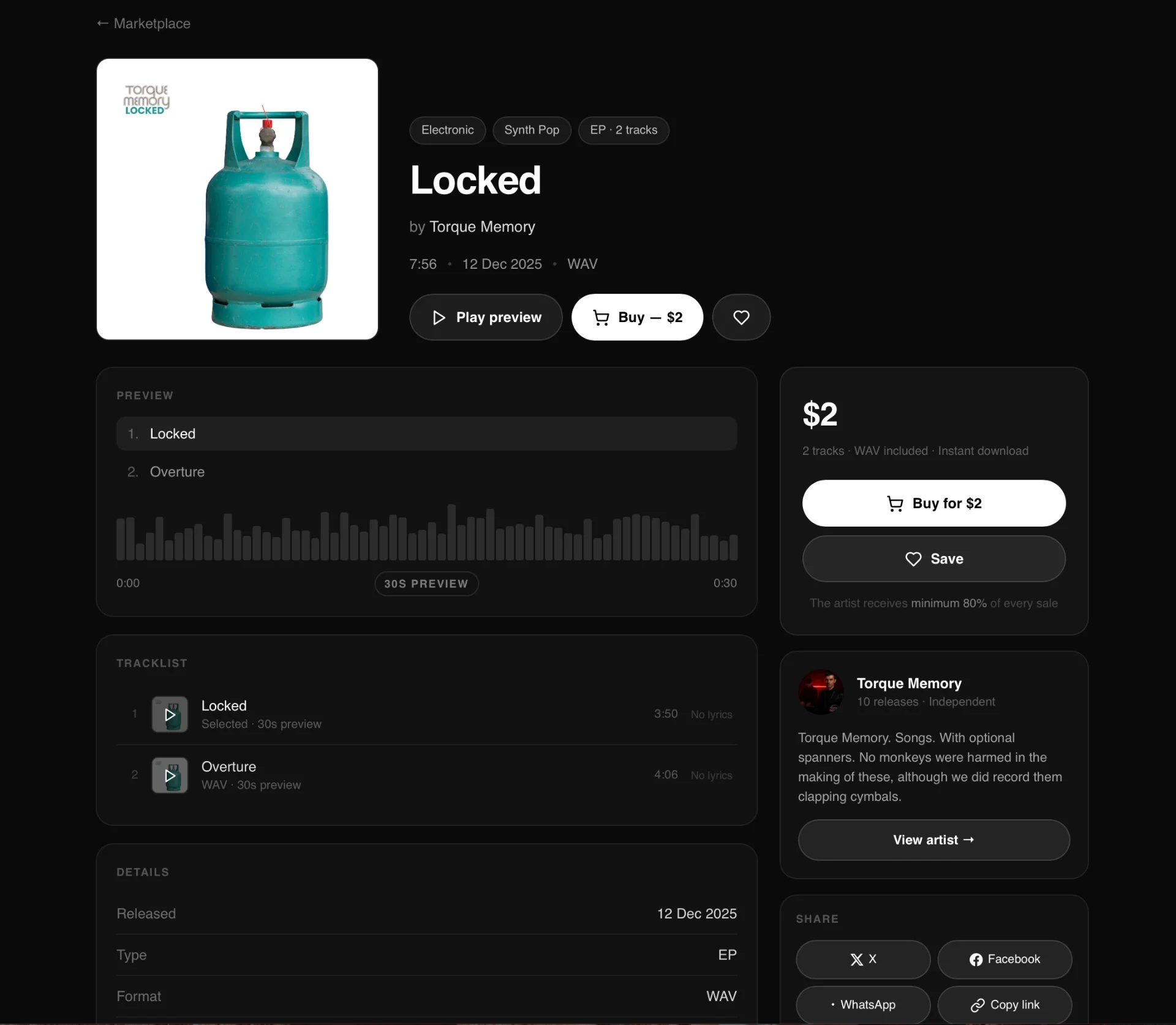
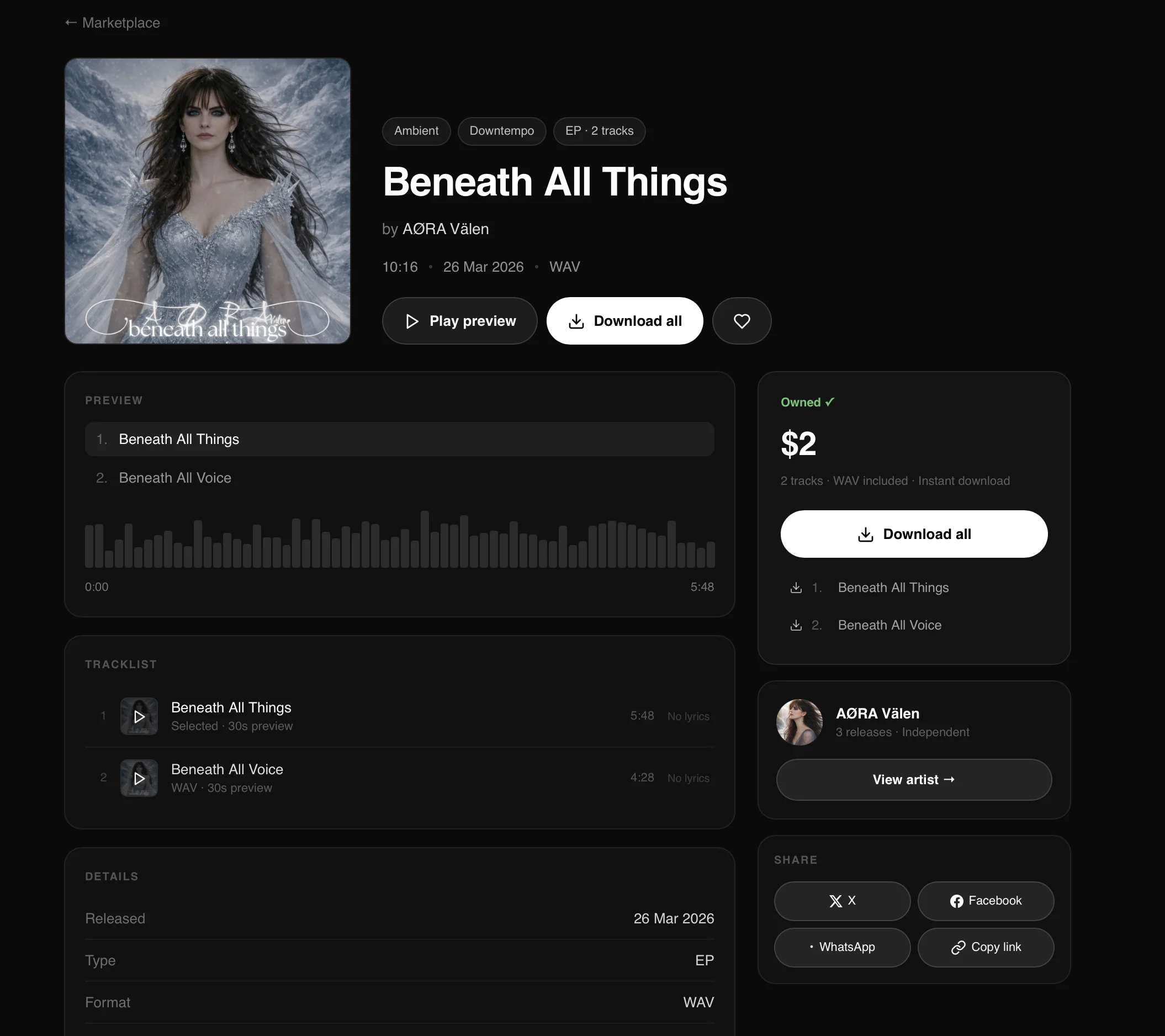
Sticky purchase action
On desktop, the right-hand sidebar — price, buy/download button, save button, artist card, and share options — stays fixed in view as the page scrolls.On mobile, a persistent bar at the bottom of the screen keeps the preview, buy/download, and save actions accessible at all times.Share buttons
Each release page includes share options for X, Facebook, and WhatsApp, plus a copy link button.- X, Facebook, WhatsApp — pre-fill with the release title and share URL as the message
- Copy link — copies the bare share URL only, with no pre-written message
Existing releases
All releases published before this update have been automatically migrated to dedicated pages. No artist action is required. Description, mood tags, and style tags filled in at upload are now visible on the release page.Visibility rules
- Play count — visible to the artist in their dashboard and to admin only. Never displayed on the public release page.
- Download button — shown in place of the buy button for users who have already purchased the release.
- Owned badge — displayed to users who have purchased the release.
The WAVjunkie Community is here
We’ve wanted to build this since before WAVjunkie launched. Today it’s live.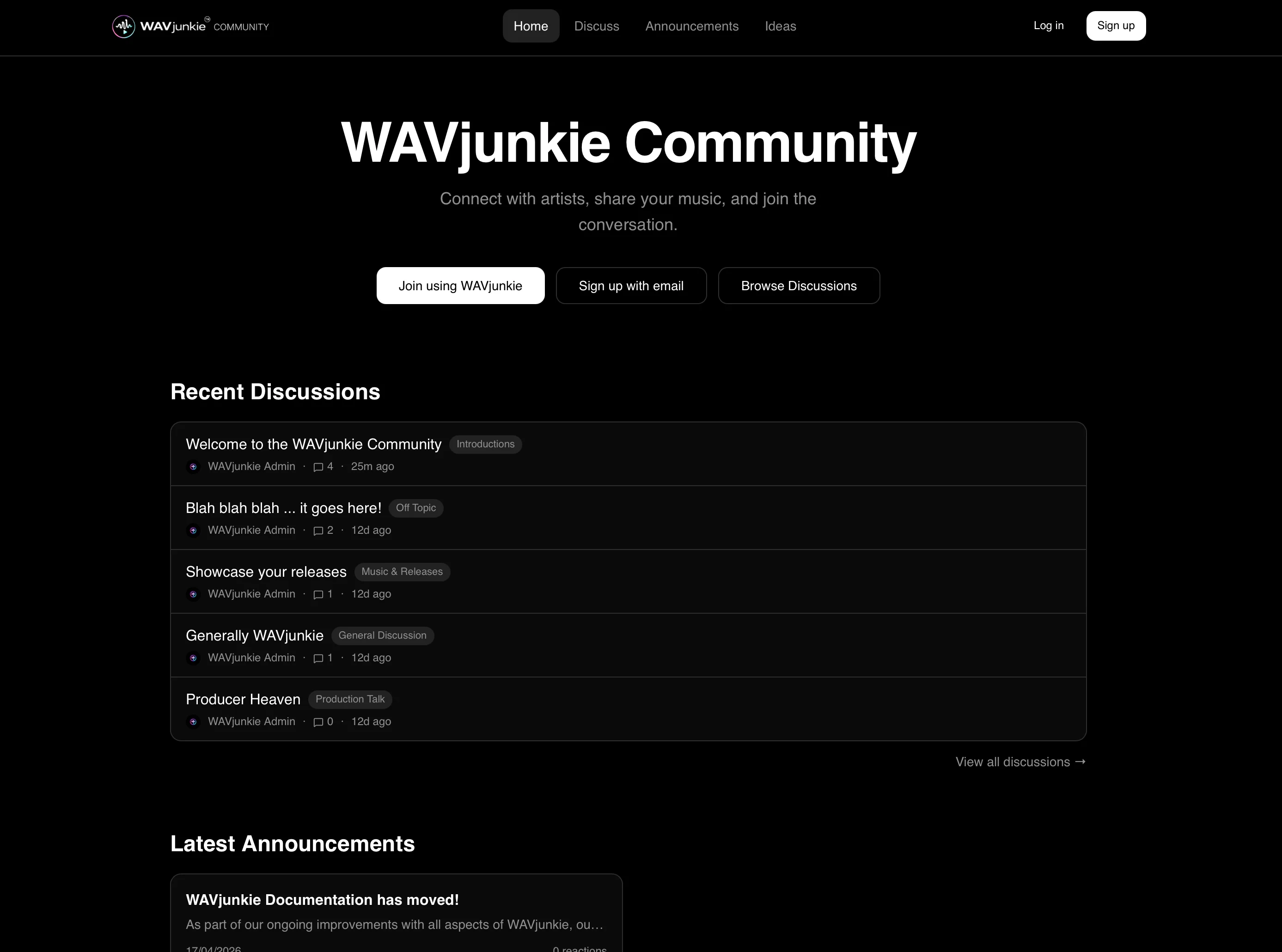
What’s there
Forum. Five categories to start: General Discussion, Music & Releases, Production Talk, WAVjunkie Help, and Introductions. If you’ve got something to say, there’s a place for it.Announcements. Everything that ships on WAVjunkie gets posted here first — features, changes, events. React, comment, keep up.Feature Ideas. Submit an idea, vote on others, watch what gets built. This is how we decide what comes next.How posting works
New here? You can comment from day one. To start your own threads, you’ll need to comment on five posts and pick up at least one like first. It’s a small bar — it just means the forum stays a real conversation rather than a broadcast channel.Your first comment gets an automatic like from us. Consider it a welcome.The Artist on WAVjunkie badge
If you’re an artist on the platform, you can request a verified badge from your profile settings. Add your WAVjunkie artist link, submit the request, and we’ll confirm it manually. Once verified, it shows up next to your name everywhere on the community site.What’s next
The community site will grow alongside the platform. As WAVjunkie adds features, the community is where we’ll talk about them — and where your feedback will shape what we build.Come and say hello in Introductions.— The WAVjunkie teamUpload Flow Improvements
Latest UI/UX improvements to the upload flow.Drag & drop for licence uploads — Both the mechanical licence and sample authorisation fields now accept dragged PDF files with full validation (type and size). Drop zones show clear labels.Global drop prevention — Added a page-level listener that prevents the browser from navigating away if a file is dropped anywhere outside a designated drop zone.Auto-save on step navigation — Artists now see a brief “Progress auto-saved” toast every time they click Next or Back, confirming their draft is saved. The Save Draft button remains available on steps 2–4.Upload recovery banner — Added in case of browser or auth session issues. Includes a “Save as Draft to My Releases” button so artists can save all recovered metadata directly to the database as a draft release, with placeholder track records created for titles and durations. Artists simply edit the draft in My Releases and re-upload the WAV files.We’ve been listening
A small but meaningful set of improvements based on your feedback.New — Disco and Europop added as Pop sub-genresTwo frequently requested categories are now available when uploading or tagging releases under Pop.Improved — Edit release modal now covers all fieldsEvery field available at upload is now editable in the release modal. No more workarounds for details you couldn’t change after publishing.Improved — Real-time genre filtering on DiscoverThe Discover page now lets you type to filter genres instantly. No manual search needed.Improved — Mechanical licence rejections now include reasonsWhen a mechanical licence is rejected, you will now receive a clear explanation and instructions by email rather than a flat rejection with no context.These updates came directly from artist feedback. Keep it coming — every report and suggestion gets read. 🎧WAVjunkie is LIVE!
At long last, the day has arrived. WAVjunkie opens its doors to independent artists worldwide on Easter Sunday, 5th April 2026.More than 12 months of planning, building, iteration, and hard work — and here we are. Welcome to WAVjunkie.Visit wavjunkie.com to get started.Launch Date Announced
WAVjunkie will officially launch on Easter Sunday — April 5th 2026 — at midday CET (Central European Time).Given our pre-launch and pre-revenue status, combined with our platform structure, we have been given the green light by BMI, the global PRO, to launch.We can’t wait and hope you join us on this journey.Visit wavjunkie.com to get started or read our latest updates at blog.wavjunkie.com.Licensing Update
WAVjunkie is doing everything by the book — open and transparent, because that is what everyone deserves.As part of our pre-launch compliance, we have been acquiring the necessary information, guidance, and licences from the major Performing Rights Organisations (PROs).Because of the way WAVjunkie is positioned — with artists granting us non-exclusive licences directly — BMI has confirmed: “You will not need a digital licence from us if all songwriters are granting direct licences to you.”WAVjunkie also requires mechanical licences from artists uploading cover versions, and artists can enter additional credits for their tracks where applicable.We are still awaiting final guidance from other PROs but are pleased to have this confirmation from BMI.WAVjunkie Blog Now Live
The official WAVjunkie blog is now available at blog.wavjunkie.com.The blog publishes platform updates, independent artist spotlights, music distribution insights, industry guidance, and roadmap announcements. All content is structured for search visibility and ongoing discoverability.New Artist and Track Sharing Links
A new dedicated sharing link structure has been implemented across WAVjunkie artist profiles and individual tracks.Artist profile sharing — Each artist profile now generates a sharing link that displays the profile image, artist description, and structured metadata for improved link previews across social networks and messaging platforms.Track-level sharing — Individual tracks now generate enhanced share links that automatically inject a predefined message, display cover artwork, and pull structured Open Graph metadata for improved formatting across major social platforms.EPs and albums also have full copy links which open the sharing modal when clicked by external users. All tracks have their own individual shareable links.Development Update
WAVjunkie is now completely developed and in final testing ahead of launch.Final changes completed:- Addition of an explicit lyrics option to the music upload process
- Ability for Listener accounts to switch to Artist accounts in order to upload music within WAVjunkie plan limits