> ## Documentation Index
> Fetch the complete documentation index at: https://docs.wavjunkie.com/llms.txt
> Use this file to discover all available pages before exploring further.
# Changelog
> Product updates and announcements
## One workspace, many artist identities
You can now run **multiple artist profiles** from a single WAVjunkie account — perfect for producers with side projects, aliases, or collaborative acts. Your login, payout setup, and billing stay on the **main workspace**, while each artist profile gets its own public identity.
### What each artist profile gets
* Its own **public artist page** at its own URL (and discoverable on the Artists page)
* Its own **display name, avatar, banner, bio, country, and social links**
* Its own **releases**, attributed and shareable independently
* Its own **Fan Mail account** — separate subscribers, separate signup page, separate campaigns
### What stays shared on the main workspace
* **Login and security** (password, 2FA, recovery codes)
* **Payout setup** and earnings (one Stripe connection for all profiles)
* **Plan, billing, and Fan Mail sending quota** (shared across every profile)
* **Reply-to email** on Fan Mail campaigns (always your workspace email)
### Fan Mail is now profile-specific
Each artist profile has its **own subscriber list and signup link**. Fans subscribing to one profile won't automatically receive emails from your other profiles — they choose which artist to follow. Existing subscribers stay attached to your **default profile**, so nothing is lost.
When composing a campaign, the **active profile** in the Fan Mail dashboard determines who receives it, and the "From" name shown to fans matches that profile.
### Switching profiles
Use the profile switcher in the Fan Mail and release tools to jump between identities. The active profile is clearly labelled at the top of each screen so you always know which one you're managing.
### Plan limits
* **Free** — 1 artist profile
* **Grow** — up to 5 artist profiles
* **Pro** — unlimited artist profiles
## Editing a release's artist now updates its URL
When you re-attribute a release to a different main artist, the **release URL automatically updates** to match the new artist's slug. You'll see a confirmation toast warning that the old link will no longer work, so you can update anywhere you've shared it.
Old links continue to redirect to the release for a grace period, so existing shares won't break overnight.
## One tap to promote any release
The post-publish share modal is now available to **every artist** for **every published release** — not just brand-new drops. Open it from **My Releases → Share your release** on any live release (or **Share Coming Soon** for scheduled drops).
### What's inside
* Cover art preview with the release title, artist, and track count
* A pre-written **Your message** caption you can edit before posting
* One-tap buttons for **Instagram, TikTok, X, Facebook, WhatsApp** and **Copy link**
* **Save image** (cover art with a WAVjunkie watermark), **Copy message**, and **Copy message + link**
### Smart default messages
The caption adapts to where the release is in its lifecycle, so you never have to write it from scratch:
* **Pre-release (scheduled)** — *"\{Title} drops on \{date} — stay tuned!"*
* **First 24 hours after going live** — *"\{Title} just dropped on WAVjunkie — check it out!"* (with a ✦ Just dropped badge on the share card)
* **After 24 hours** — *"\{Title} is on WAVjunkie — check it out!"*
Edit the message any time before sharing — the link is always appended automatically.
## Share your release your way
We've simplified the release share screen to give you more control:
* **Save image** — download your cover art with a small WAVjunkie logo overlay, ready to post anywhere.
* **Copy message** — copy just the share message text.
* **Copy message + link** — copy your message together with the shareable link in one tap.
Social platform buttons (Instagram, TikTok, X, Facebook) now open the platform directly in a new tab and copy your message + link to your clipboard, so you can paste it into whichever post format you prefer. WhatsApp continues to open with your message pre-filled.
## Grow the platform. Lower your fees. Keep what you earn.
The WAVjunkie Referral Programme is now live. Every verified referral permanently reduces the commission WAVjunkie takes on your sales — so you keep more on every track you sell, forever.
### How it works
Share your unique referral link with other independent artists. A referral is counted once the artist you referred has:
* Signed up using your link
* Completed Stripe Connect verification
* Published a live track
* Remained active through a 14-day qualifying period
Once counted, your commission tier drops automatically. No activation required.
### Commission tiers
| Tier | Referrals | Platform fee | You keep |
| ------ | --------- | ------------ | -------- |
| Base | 0 | 20% | 80% |
| Bronze | 5 | 18% | 82% |
| Silver | 10 | 15% | 85% |
| Gold | 25 | 10% | 90% |
Once you reach a tier, you keep it permanently. It does not reset, expire, or reduce.
### Your referral dashboard
Find everything under **Referrals** in your account menu. The dashboard shows your unique invite link, counted referrals, referrals in pipeline, your current tier, and progress toward the next tier. Each pipeline entry shows the days remaining in its 14-day qualifying period.
### Notes for early supporters
Pre-launch artists keep their 15% platform fee at Base, Bronze, and Silver — and still drop to 10% upon reaching Gold (25 counted referrals).
### Requirements
* Your referral link unlocks once Stripe Connect payout onboarding is complete
* The 14-day qualifying period ensures every counted referral is a real, active artist
* Tier recalculation is automatic — no admin action required
## Lyrics for any track
Artists can now add lyrics to any track in their catalogue — new releases and existing ones alike. Lyrics are displayed on release pages for logged-in users.
### Adding lyrics
The lyrics field is **per-track**, not per-release, and lives inside each track in the upload flow and the edit release modal.
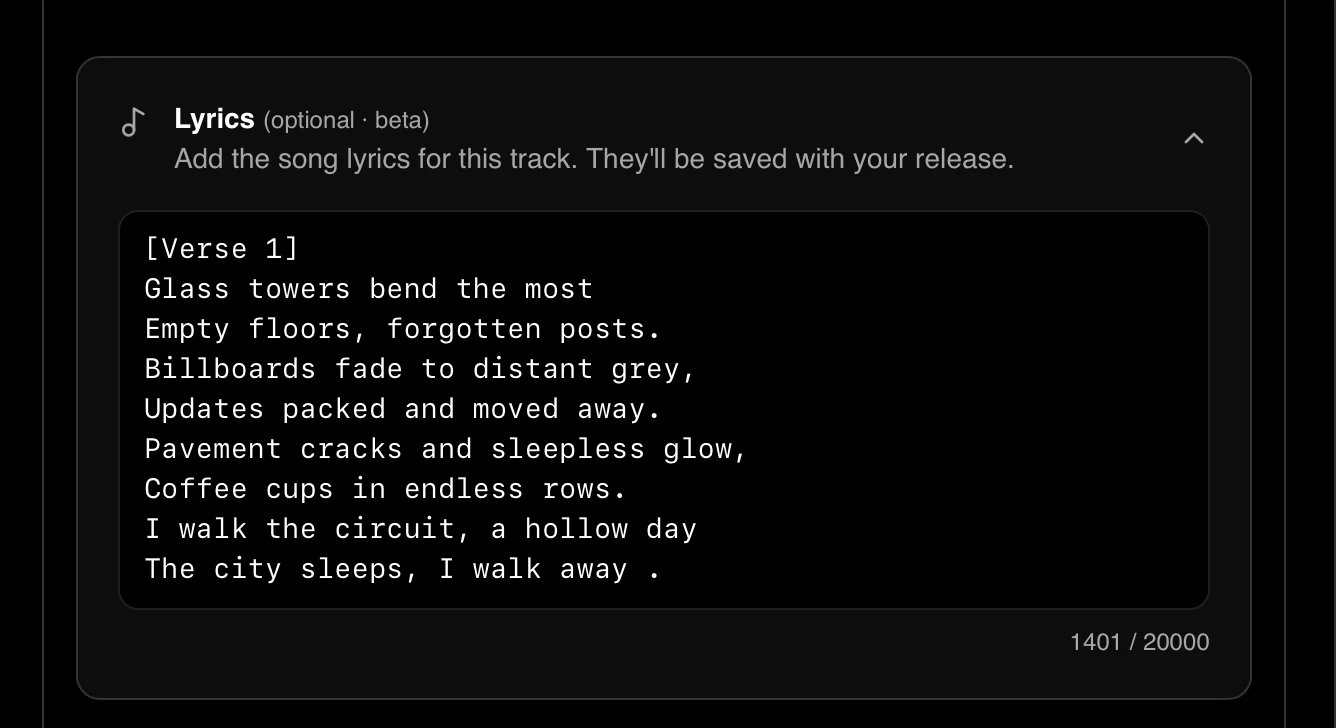 * **Format:** Plain text only. Line breaks are preserved exactly as entered.
* **Required:** No. Lyrics are optional on every track.
* **Review:** None. Lyrics go live the moment you save.
* **Editing:** Update or remove lyrics at any time from the dashboard.
### Viewing lyrics
Lyrics are visible to **logged-in users only**. Logged-out visitors don't see a locked or disabled state — the Lyrics button is simply absent.
On releases with a tracklist (EPs and albums), each track row that has lyrics shows a **Lyrics** button next to the duration. Tracks without lyrics show a muted **No lyrics** label instead. For single-track releases, the Lyrics button appears in the hero action row alongside Play preview, Buy, and Save.
### Desktop panel
On desktop, lyrics open in a slide-in panel from the right edge of the page. The main content dims slightly while the panel is open. Clicking another track's Lyrics button while the panel is already open swaps the content in place — no close-and-reopen flicker.
### Mobile sheet
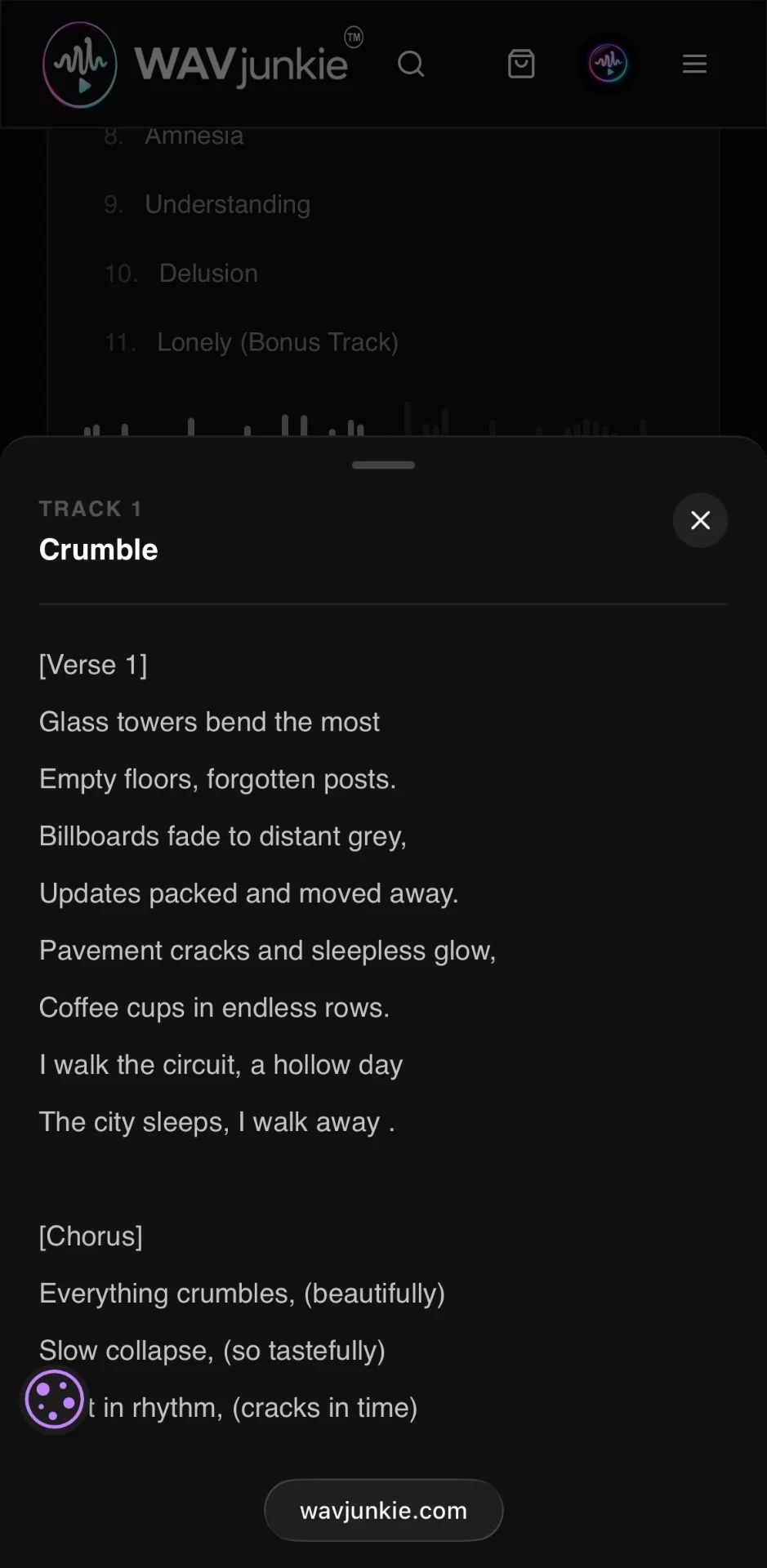
On mobile, lyrics open as a bottom sheet with a drag handle, taking 70% of the viewport height. Tap the overlay or the close button to dismiss.
* **Format:** Plain text only. Line breaks are preserved exactly as entered.
* **Required:** No. Lyrics are optional on every track.
* **Review:** None. Lyrics go live the moment you save.
* **Editing:** Update or remove lyrics at any time from the dashboard.
### Viewing lyrics
Lyrics are visible to **logged-in users only**. Logged-out visitors don't see a locked or disabled state — the Lyrics button is simply absent.
On releases with a tracklist (EPs and albums), each track row that has lyrics shows a **Lyrics** button next to the duration. Tracks without lyrics show a muted **No lyrics** label instead. For single-track releases, the Lyrics button appears in the hero action row alongside Play preview, Buy, and Save.
### Desktop panel
On desktop, lyrics open in a slide-in panel from the right edge of the page. The main content dims slightly while the panel is open. Clicking another track's Lyrics button while the panel is already open swaps the content in place — no close-and-reopen flicker.
### Mobile sheet
On mobile, lyrics open as a bottom sheet with a drag handle, taking 70% of the viewport height. Tap the overlay or the close button to dismiss.
 ## Every release now has its own page
Releases on WAVjunkie no longer open in a modal on top of the Marketplace. Each release now lives at its own dedicated URL:
```
wavjunkie.com/release/[artist-slug]/[release-slug]
```
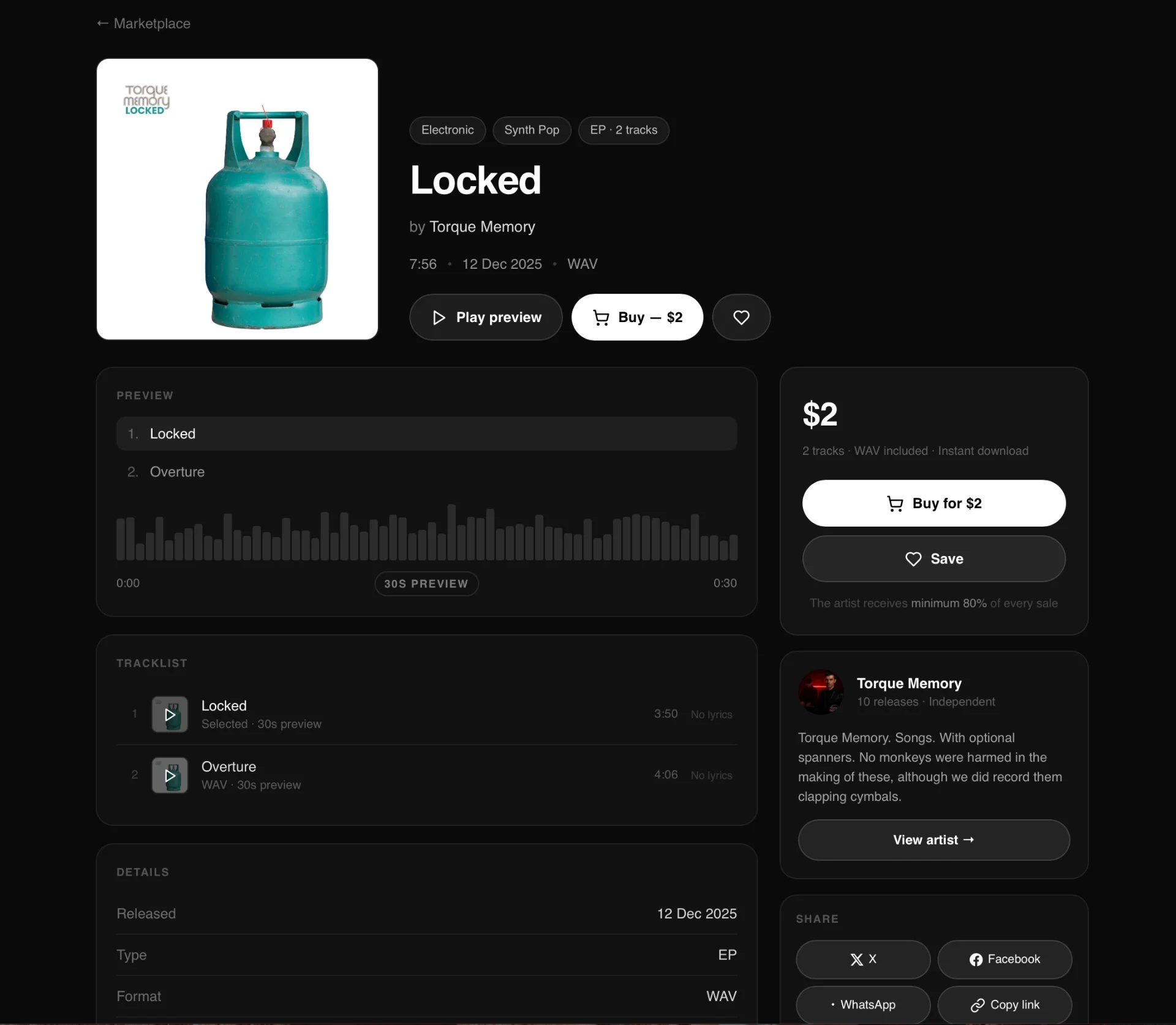
The page brings together everything an artist uploaded at submission — full-size artwork, genre and sub-genre, release type, format, duration, label, release date, description, mood tags (up to 5), and style tags (up to 3) — alongside a 30-second waveform preview player and the full tracklist with individual track previews. An artist info card links through to the full artist profile.
### Buy or download, depending on ownership
For users who haven't purchased the release, the page shows the price, a **Buy** button, and a **Save** button.
## Every release now has its own page
Releases on WAVjunkie no longer open in a modal on top of the Marketplace. Each release now lives at its own dedicated URL:
```
wavjunkie.com/release/[artist-slug]/[release-slug]
```
The page brings together everything an artist uploaded at submission — full-size artwork, genre and sub-genre, release type, format, duration, label, release date, description, mood tags (up to 5), and style tags (up to 3) — alongside a 30-second waveform preview player and the full tracklist with individual track previews. An artist info card links through to the full artist profile.
### Buy or download, depending on ownership
For users who haven't purchased the release, the page shows the price, a **Buy** button, and a **Save** button.
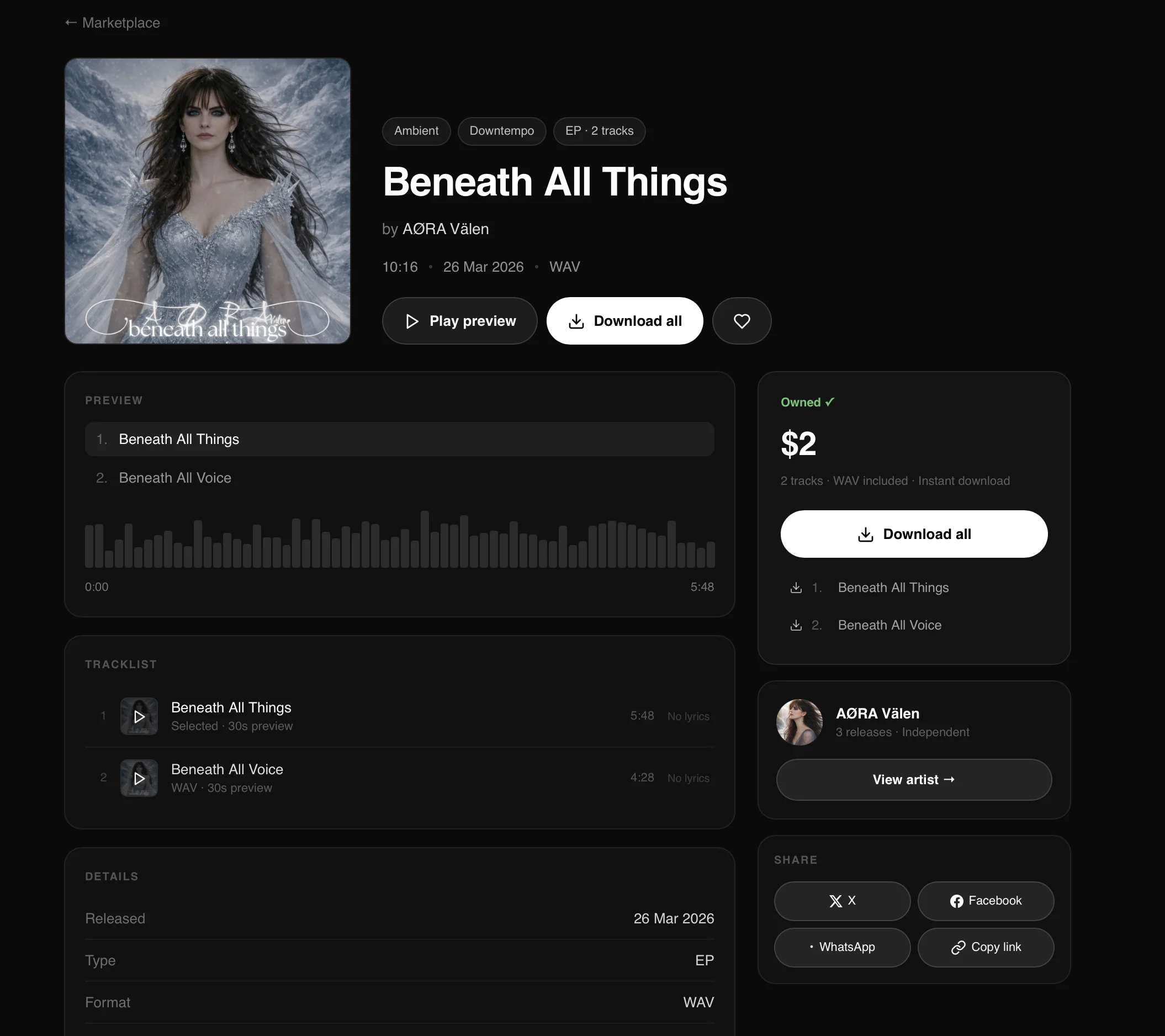
 For users who already own the release, the buy button is replaced with a **Download all** action, alongside per-track downloads and an **Owned ✓** badge.
 ### Sticky purchase action
On desktop, the right-hand sidebar — price, buy/download button, save button, artist card, and share options — stays fixed in view as the page scrolls.
On mobile, a persistent bar at the bottom of the screen keeps the preview, buy/download, and save actions accessible at all times.
### Share buttons
Each release page includes share options for X, Facebook, and WhatsApp, plus a copy link button.
* **X, Facebook, WhatsApp** — pre-fill with the release title and share URL as the message
* **Copy link** — copies the bare share URL only, with no pre-written message
Share URL format:
```
share.wavjunkie.com/artist/[artist-slug]/[release-slug]
```
### Existing releases
All releases published before this update have been automatically migrated to dedicated pages. No artist action is required. Description, mood tags, and style tags filled in at upload are now visible on the release page.
### Visibility rules
* **Play count** — visible to the artist in their dashboard and to admin only. Never displayed on the public release page.
* **Download button** — shown in place of the buy button for users who have already purchased the release.
* **Owned badge** — displayed to users who have purchased the release.
## The WAVjunkie Community is here
We've wanted to build this since before WAVjunkie launched. Today it's live.
### Sticky purchase action
On desktop, the right-hand sidebar — price, buy/download button, save button, artist card, and share options — stays fixed in view as the page scrolls.
On mobile, a persistent bar at the bottom of the screen keeps the preview, buy/download, and save actions accessible at all times.
### Share buttons
Each release page includes share options for X, Facebook, and WhatsApp, plus a copy link button.
* **X, Facebook, WhatsApp** — pre-fill with the release title and share URL as the message
* **Copy link** — copies the bare share URL only, with no pre-written message
Share URL format:
```
share.wavjunkie.com/artist/[artist-slug]/[release-slug]
```
### Existing releases
All releases published before this update have been automatically migrated to dedicated pages. No artist action is required. Description, mood tags, and style tags filled in at upload are now visible on the release page.
### Visibility rules
* **Play count** — visible to the artist in their dashboard and to admin only. Never displayed on the public release page.
* **Download button** — shown in place of the buy button for users who have already purchased the release.
* **Owned badge** — displayed to users who have purchased the release.
## The WAVjunkie Community is here
We've wanted to build this since before WAVjunkie launched. Today it's live.
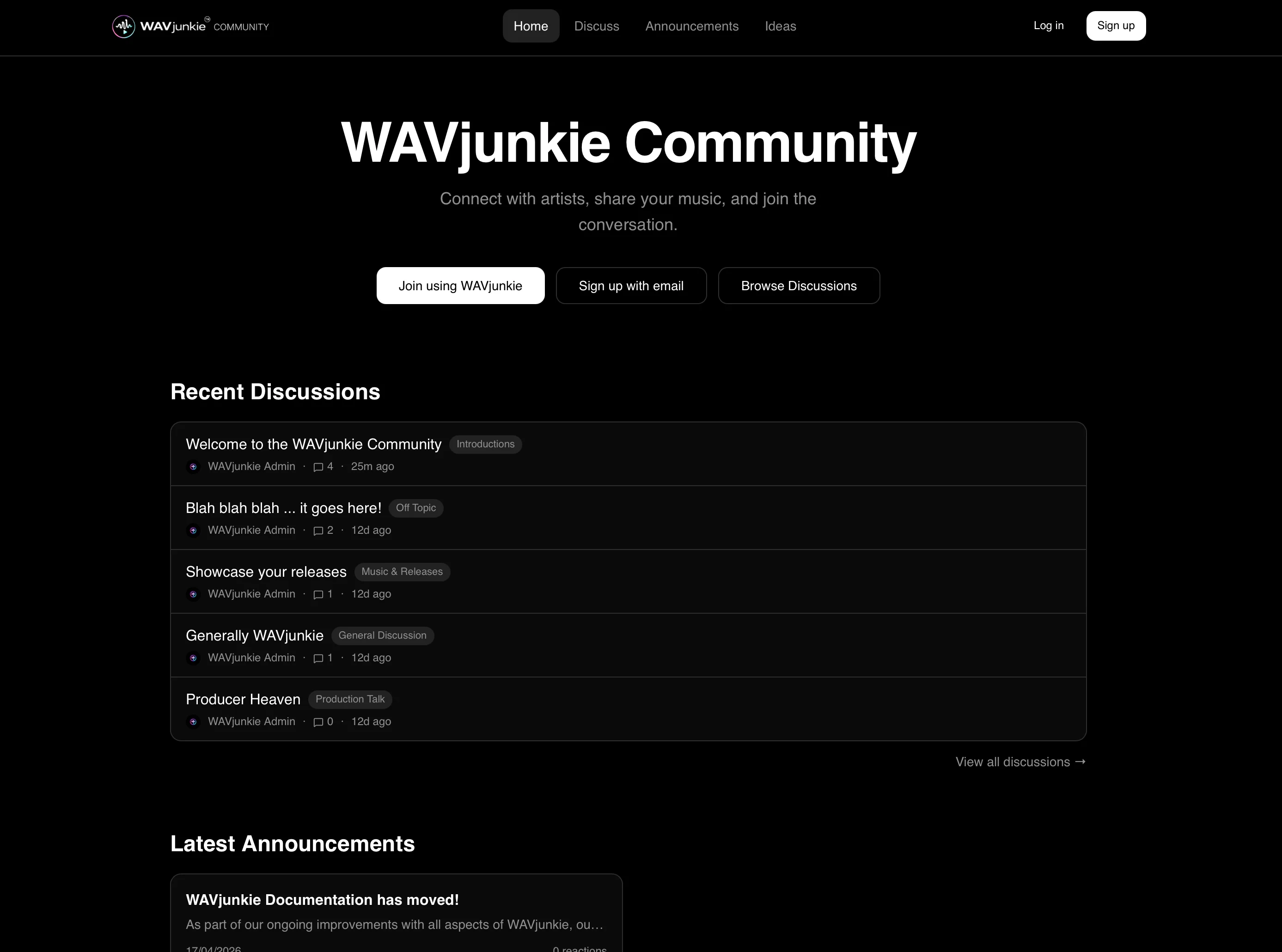 **[community.wavjunkie.com](https://community.wavjunkie.com)** is the dedicated home for everyone in the WAVjunkie world — artists, listeners, and anyone who wants to be part of where independent music is going.
### What's there
**Forum.** Five categories to start: General Discussion, Music & Releases, Production Talk, WAVjunkie Help, and Introductions. If you've got something to say, there's a place for it.
**Announcements.** Everything that ships on WAVjunkie gets posted here first — features, changes, events. React, comment, keep up.
**Feature Ideas.** Submit an idea, vote on others, watch what gets built. This is how we decide what comes next.
### How posting works
New here? You can comment from day one. To start your own threads, you'll need to comment on five posts and pick up at least one like first. It's a small bar — it just means the forum stays a real conversation rather than a broadcast channel.
Your first comment gets an automatic like from us. Consider it a welcome.
### The Artist on WAVjunkie badge
If you're an artist on the platform, you can request a verified badge from your profile settings. Add your WAVjunkie artist link, submit the request, and we'll confirm it manually. Once verified, it shows up next to your name everywhere on the community site.
### What's next
The community site will grow alongside the platform. As WAVjunkie adds features, the community is where we'll talk about them — and where your feedback will shape what we build.
Come and say hello in Introductions.
— The WAVjunkie team
## Upload Flow Improvements
Latest UI/UX improvements to the upload flow.
**Drag & drop for licence uploads** — Both the mechanical licence and sample authorisation fields now accept dragged PDF files with full validation (type and size). Drop zones show clear labels.
**Global drop prevention** — Added a page-level listener that prevents the browser from navigating away if a file is dropped anywhere outside a designated drop zone.
**Auto-save on step navigation** — Artists now see a brief "Progress auto-saved" toast every time they click Next or Back, confirming their draft is saved. The Save Draft button remains available on steps 2–4.
**Upload recovery banner** — Added in case of browser or auth session issues. Includes a "Save as Draft to My Releases" button so artists can save all recovered metadata directly to the database as a draft release, with placeholder track records created for titles and durations. Artists simply edit the draft in My Releases and re-upload the WAV files.
## We've been listening
A small but meaningful set of improvements based on your feedback.
**New — Disco and Europop added as Pop sub-genres**
Two frequently requested categories are now available when uploading or tagging releases under Pop.
**Improved — Edit release modal now covers all fields**
Every field available at upload is now editable in the release modal. No more workarounds for details you couldn't change after publishing.
**Improved — Real-time genre filtering on Discover**
The Discover page now lets you type to filter genres instantly. No manual search needed.
**Improved — Mechanical licence rejections now include reasons**
When a mechanical licence is rejected, you will now receive a clear explanation and instructions by email rather than a flat rejection with no context.
These updates came directly from artist feedback. Keep it coming — every report and suggestion gets read. 🎧
## WAVjunkie is LIVE!
At long last, the day has arrived. WAVjunkie opens its doors to independent artists worldwide on Easter Sunday, 5th April 2026.
More than 12 months of planning, building, iteration, and hard work — and here we are. Welcome to WAVjunkie.
Visit [wavjunkie.com](https://wavjunkie.com) to get started.
## Launch Date Announced
WAVjunkie will officially launch on Easter Sunday — April 5th 2026 — at midday CET (Central European Time).
Given our pre-launch and pre-revenue status, combined with our platform structure, we have been given the green light by BMI, the global PRO, to launch.
We can't wait and hope you join us on this journey.
Visit [wavjunkie.com](https://wavjunkie.com) to get started or read our latest updates at [blog.wavjunkie.com](https://blog.wavjunkie.com).
## Licensing Update
WAVjunkie is doing everything by the book — open and transparent, because that is what everyone deserves.
As part of our pre-launch compliance, we have been acquiring the necessary information, guidance, and licences from the major Performing Rights Organisations (PROs).
Because of the way WAVjunkie is positioned — with artists granting us non-exclusive licences directly — BMI has confirmed: **"You will not need a digital licence from us if all songwriters are granting direct licences to you."**
WAVjunkie also requires mechanical licences from artists uploading cover versions, and artists can enter additional credits for their tracks where applicable.
We are still awaiting final guidance from other PROs but are pleased to have this confirmation from BMI.
## WAVjunkie Blog Now Live
The official WAVjunkie blog is now available at [blog.wavjunkie.com](https://blog.wavjunkie.com).
The blog publishes platform updates, independent artist spotlights, music distribution insights, industry guidance, and roadmap announcements. All content is structured for search visibility and ongoing discoverability.
## New Artist and Track Sharing Links
A new dedicated sharing link structure has been implemented across WAVjunkie artist profiles and individual tracks.
**Artist profile sharing** — Each artist profile now generates a sharing link that displays the profile image, artist description, and structured metadata for improved link previews across social networks and messaging platforms.
**Track-level sharing** — Individual tracks now generate enhanced share links that automatically inject a predefined message, display cover artwork, and pull structured Open Graph metadata for improved formatting across major social platforms.
EPs and albums also have full copy links which open the sharing modal when clicked by external users. All tracks have their own individual shareable links.
## Development Update
WAVjunkie is now completely developed and in final testing ahead of launch.
Final changes completed:
* Addition of an explicit lyrics option to the music upload process
* Ability for Listener accounts to switch to Artist accounts in order to upload music within WAVjunkie plan limits
**[community.wavjunkie.com](https://community.wavjunkie.com)** is the dedicated home for everyone in the WAVjunkie world — artists, listeners, and anyone who wants to be part of where independent music is going.
### What's there
**Forum.** Five categories to start: General Discussion, Music & Releases, Production Talk, WAVjunkie Help, and Introductions. If you've got something to say, there's a place for it.
**Announcements.** Everything that ships on WAVjunkie gets posted here first — features, changes, events. React, comment, keep up.
**Feature Ideas.** Submit an idea, vote on others, watch what gets built. This is how we decide what comes next.
### How posting works
New here? You can comment from day one. To start your own threads, you'll need to comment on five posts and pick up at least one like first. It's a small bar — it just means the forum stays a real conversation rather than a broadcast channel.
Your first comment gets an automatic like from us. Consider it a welcome.
### The Artist on WAVjunkie badge
If you're an artist on the platform, you can request a verified badge from your profile settings. Add your WAVjunkie artist link, submit the request, and we'll confirm it manually. Once verified, it shows up next to your name everywhere on the community site.
### What's next
The community site will grow alongside the platform. As WAVjunkie adds features, the community is where we'll talk about them — and where your feedback will shape what we build.
Come and say hello in Introductions.
— The WAVjunkie team
## Upload Flow Improvements
Latest UI/UX improvements to the upload flow.
**Drag & drop for licence uploads** — Both the mechanical licence and sample authorisation fields now accept dragged PDF files with full validation (type and size). Drop zones show clear labels.
**Global drop prevention** — Added a page-level listener that prevents the browser from navigating away if a file is dropped anywhere outside a designated drop zone.
**Auto-save on step navigation** — Artists now see a brief "Progress auto-saved" toast every time they click Next or Back, confirming their draft is saved. The Save Draft button remains available on steps 2–4.
**Upload recovery banner** — Added in case of browser or auth session issues. Includes a "Save as Draft to My Releases" button so artists can save all recovered metadata directly to the database as a draft release, with placeholder track records created for titles and durations. Artists simply edit the draft in My Releases and re-upload the WAV files.
## We've been listening
A small but meaningful set of improvements based on your feedback.
**New — Disco and Europop added as Pop sub-genres**
Two frequently requested categories are now available when uploading or tagging releases under Pop.
**Improved — Edit release modal now covers all fields**
Every field available at upload is now editable in the release modal. No more workarounds for details you couldn't change after publishing.
**Improved — Real-time genre filtering on Discover**
The Discover page now lets you type to filter genres instantly. No manual search needed.
**Improved — Mechanical licence rejections now include reasons**
When a mechanical licence is rejected, you will now receive a clear explanation and instructions by email rather than a flat rejection with no context.
These updates came directly from artist feedback. Keep it coming — every report and suggestion gets read. 🎧
## WAVjunkie is LIVE!
At long last, the day has arrived. WAVjunkie opens its doors to independent artists worldwide on Easter Sunday, 5th April 2026.
More than 12 months of planning, building, iteration, and hard work — and here we are. Welcome to WAVjunkie.
Visit [wavjunkie.com](https://wavjunkie.com) to get started.
## Launch Date Announced
WAVjunkie will officially launch on Easter Sunday — April 5th 2026 — at midday CET (Central European Time).
Given our pre-launch and pre-revenue status, combined with our platform structure, we have been given the green light by BMI, the global PRO, to launch.
We can't wait and hope you join us on this journey.
Visit [wavjunkie.com](https://wavjunkie.com) to get started or read our latest updates at [blog.wavjunkie.com](https://blog.wavjunkie.com).
## Licensing Update
WAVjunkie is doing everything by the book — open and transparent, because that is what everyone deserves.
As part of our pre-launch compliance, we have been acquiring the necessary information, guidance, and licences from the major Performing Rights Organisations (PROs).
Because of the way WAVjunkie is positioned — with artists granting us non-exclusive licences directly — BMI has confirmed: **"You will not need a digital licence from us if all songwriters are granting direct licences to you."**
WAVjunkie also requires mechanical licences from artists uploading cover versions, and artists can enter additional credits for their tracks where applicable.
We are still awaiting final guidance from other PROs but are pleased to have this confirmation from BMI.
## WAVjunkie Blog Now Live
The official WAVjunkie blog is now available at [blog.wavjunkie.com](https://blog.wavjunkie.com).
The blog publishes platform updates, independent artist spotlights, music distribution insights, industry guidance, and roadmap announcements. All content is structured for search visibility and ongoing discoverability.
## New Artist and Track Sharing Links
A new dedicated sharing link structure has been implemented across WAVjunkie artist profiles and individual tracks.
**Artist profile sharing** — Each artist profile now generates a sharing link that displays the profile image, artist description, and structured metadata for improved link previews across social networks and messaging platforms.
**Track-level sharing** — Individual tracks now generate enhanced share links that automatically inject a predefined message, display cover artwork, and pull structured Open Graph metadata for improved formatting across major social platforms.
EPs and albums also have full copy links which open the sharing modal when clicked by external users. All tracks have their own individual shareable links.
## Development Update
WAVjunkie is now completely developed and in final testing ahead of launch.
Final changes completed:
* Addition of an explicit lyrics option to the music upload process
* Ability for Listener accounts to switch to Artist accounts in order to upload music within WAVjunkie plan limits